

If your Netlify project isn’t already linked to a Git repository, you can create a new GitHub repository directly from the Netlify dashboard and push your project’s files to the repo. This is useful when you’ve started a project with an AI agent through Agent Runners or deployed manually using Drag and Drop and want to set up continuous deployment through GitHub going forward.
Requirements
Section titled “Requirements”- A GitHub account. We do not currently support other Git providers.
Push to a new repository
Section titled “Push to a new repository”- From your Netlify project dashboard, go to Project configuration Build & deploy Continuous deployment Repository.
- From the Link to repository drop-down menu, select Push to new repository.
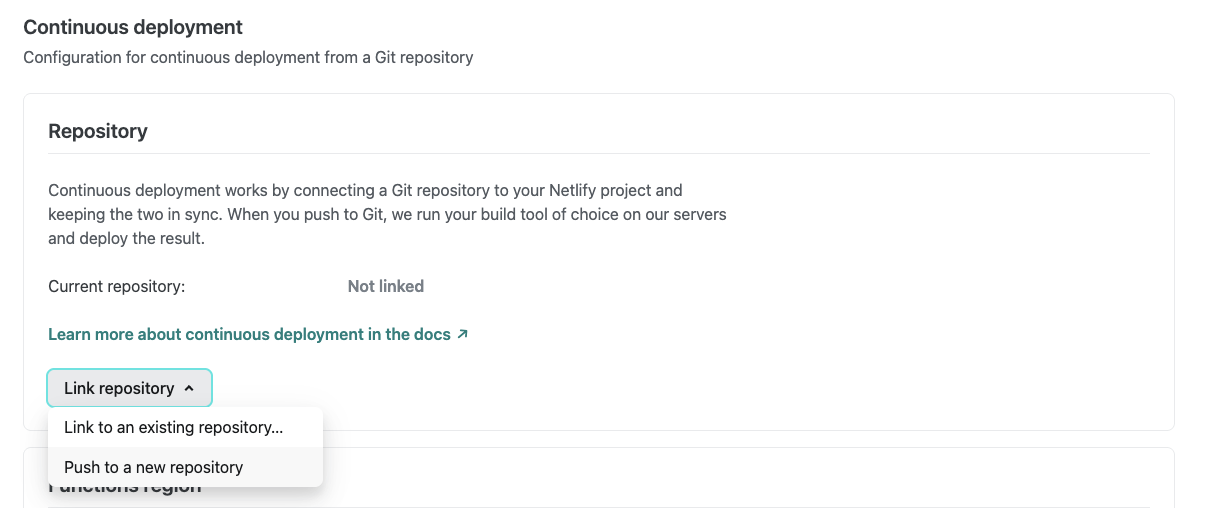
- Follow the prompts to complete the setup.
Netlify creates the repository under your selected GitHub account and pushes your project files to it. From this point on, your web project uses continuous deployment, meaning every time someone pushes changes to the repository, Netlify automatically rebuilds and redeploys your project for you.
Did you find this doc useful?
Your feedback helps us improve our docs.