

For the complete Netlify documentation index, see llms.txt. Markdown versions of any documentation page are available by appending .md to its URL. Whether you're new to Netlify or setting up your team, learn the basics of how projects work to help you manage your projects, access, and workflows.
Understand project basics
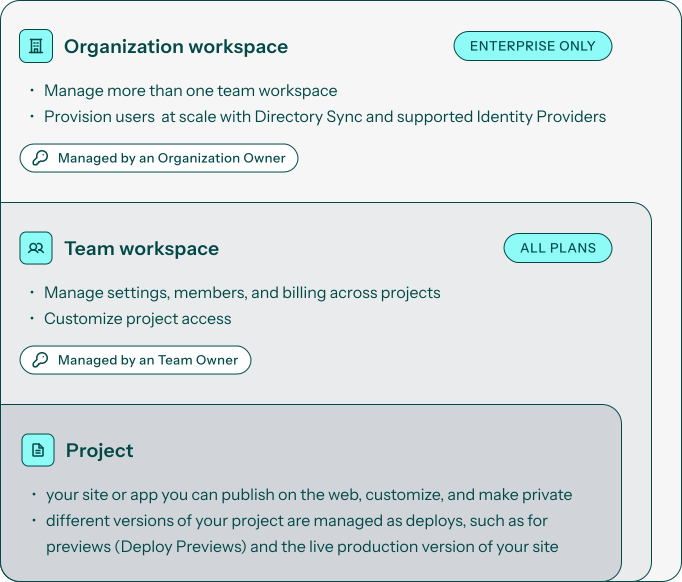
Section titled “Understand project basics”Netlify organizes your work into three levels:
- Organization workspaces (available for Enterprise plans)
- Team workspaces (available on all plans, including Free and Personal plans)
- Projects (Your sites or apps)
Your project name and your URL
Section titled “Your project name and your URL”Every project gets a default Netlify URL based on the project name:
https://your-project-name.netlify.appTo change your project name, check out Customize project name.
If you rename your project, the default URL changes to match. You can also connect a custom domain (like yoursite.com) so visitors don't see the .netlify.app address. Learn more about custom domains.
Managing versions of your project
Section titled “Managing versions of your project”A "deploy" is a version of your project built on Netlify's infrastructure. You can have multiple deploys or versions of your project but only one live production version available at the production URL. This production URL can be the default Netlify URL that ends in netlify.app or it can be a custom domain you add to your project.
Netlify supports two main types of deploys or versions of your project:
- Production deploys - uses settings for the production version of your project
- Deploy Previews - uses settings for your project's previews
Netlify also supports branch deploys, which is another version of your project based on a Git repository branch. Branch deploys are less commonly used and require a connected Git repository and must be enabled for your project. Learn more about branch deploys.
Learn more about the basics of deploys.
Learn more
Section titled “Learn more”Did you find this doc useful?
Your feedback helps us improve our docs.