

For the complete Netlify documentation index, see llms.txt. Markdown versions of any documentation page are available by appending .md to its URL. Ensure your team’s projects stay active and keep receiving web requests and form submissions by enabling auto recharge, which automatically reloads your credit balance for you when your monthly credit allotment is used up.
If you have a Personal or Pro plan that used up its credit balance, the following will happen:
- Your web projects are paused and visitors will find a
Site not availablepage at each of your projects' URLs - You cannot trigger new deploys
- Your web projects cannot receive new web requests or form submissions
You can prevent this by enabling auto recharge or by buying credit packs.
Recharge rates
Section titled “Recharge rates”As a Team Owner, once you enable credit auto recharge for your team's projects, your team will use the payment details saved for your team until one of the following happens:
- Your monthly billing cycle resets
- You disable credit auto recharge
The rate that credits are automatically recharged depends on your Credit-based pricing plan.
| Free | Personal | Pro |
|---|---|---|
| N/A | 500 credits for $5 as needed | 1500 credits for $10 as needed |
Any credits purchased through auto recharge that go unused during your monthly billing cycle do not expire and remain available for you to use in future months. Unused monthly plan credits do not roll over unless you have a Pro plan with 5,000 monthly credits or higher. Learn more about rollover credits for Pro plans.
Enable auto recharge
Section titled “Enable auto recharge”As a Team Owner, you can enable auto recharge for all of your team’s web projects.
To enable auto recharge for your team’s projects:
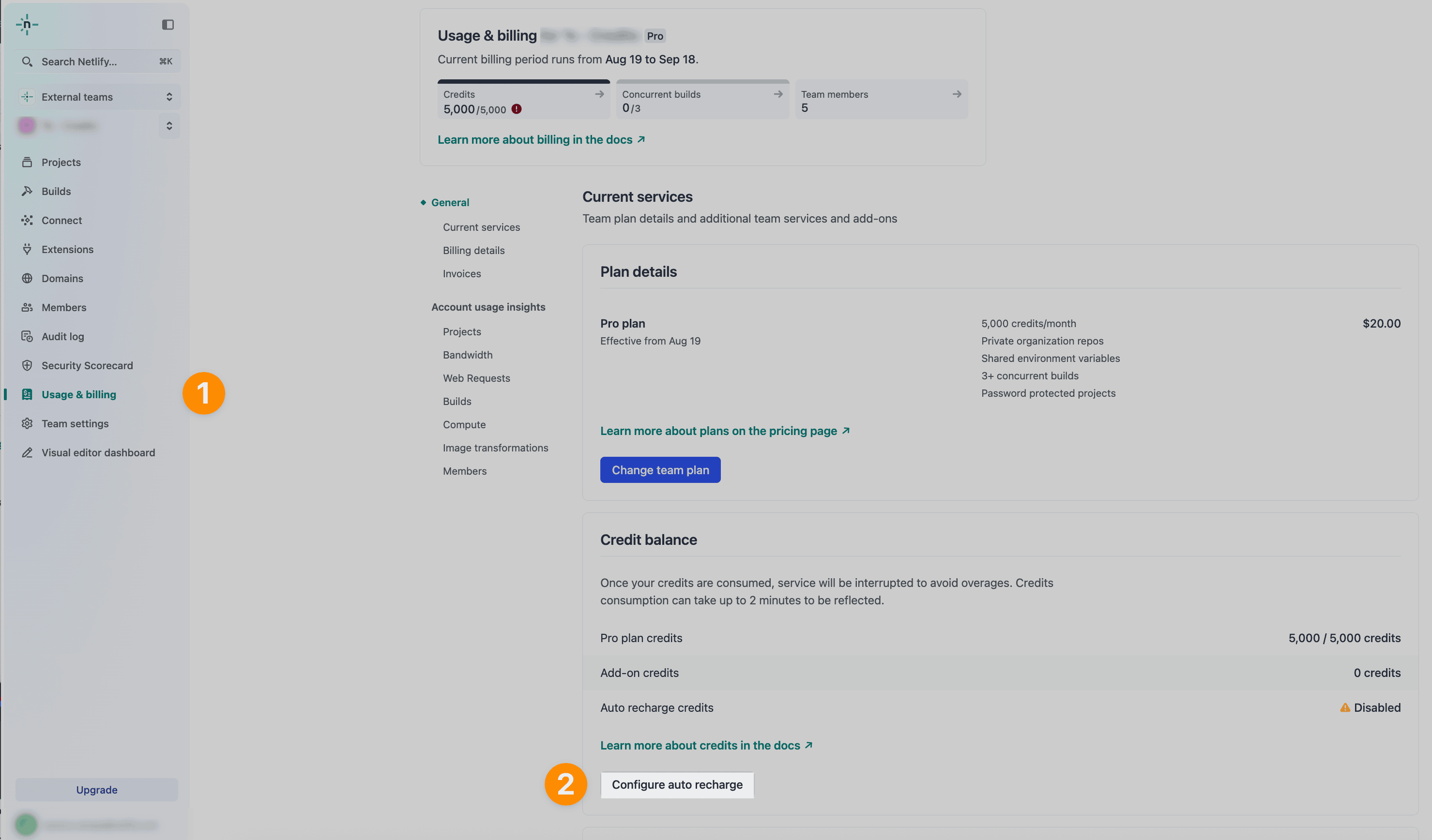
- From your Netlify team dashboard, go to Usage & billing.
- Under Current services and Credit balance, choose Configure auto recharge.
- Choose Enabled and confirm the changes.
Disable auto recharge
Section titled “Disable auto recharge”As a Team Owner, you can disable auto recharge for all of your team’s web projects.
To disable auto recharge for your team’s projects:
- From your Netlify team dashboard, go to Usage & billing.
- Under Current services and Credit balance, choose Configure auto recharge.
- Choose Disabled and confirm the changes.
Did you find this doc useful?
Your feedback helps us improve our docs.